

Delays on-site often come down to poor planning—especially when door schedules are incomplete or incorrect. Builders lose time chasing specs, replacing wrong hardware, or waiting on approvals. This article shows you how to prevent that chaos with solid door scheduling.
A door schedule is a complete list of all doors in a project with size, materials, frame type, fire rating, hardware, finish, and installation details. It prevents on-site delays by ensuring accurate deliveries, correct installations, and coordination between architects, contractors, and suppliers. Proper door scheduling avoids errors, rework, and last-minute changes, keeping construction projects on time and compliant with codes.
If you’re tired of last-minute changes and missed timelines, mastering door scheduling is your first defense. Let’s walk through the essentials and best practices that keep your project moving.
What is a Door Schedule in Construction?
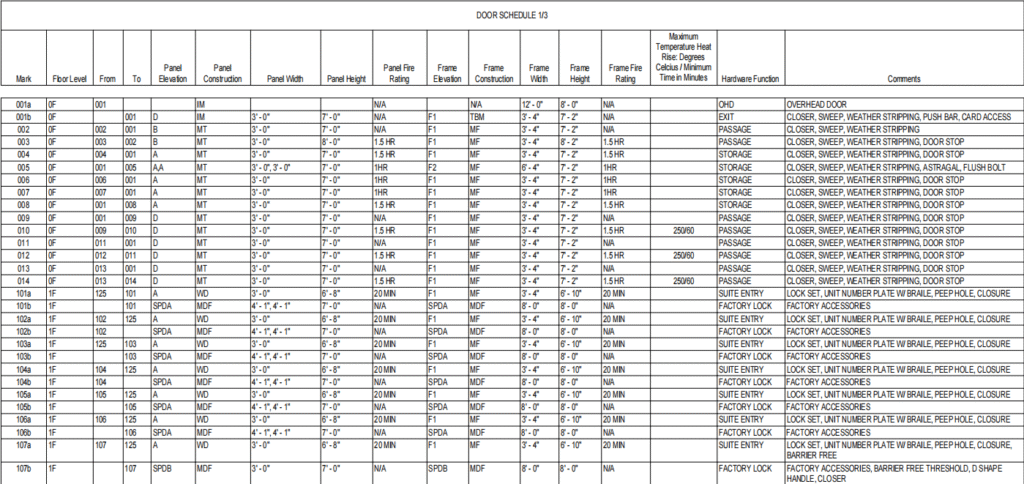
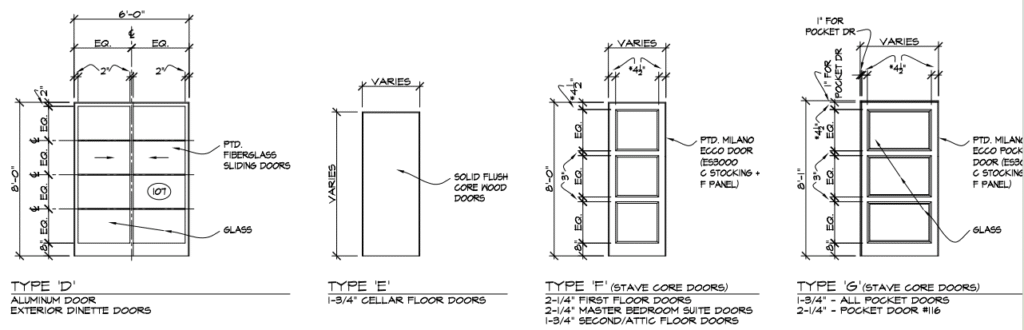
A door schedule is a comprehensive list of all doors within a construction project. It outlines critical information like size, type, materials, and installation details for each door. In architectural drawings, it’s used to bridge communication between the design team and on-site crews.
For example, an architectural door schedule typically includes a room number, door mark, and references to specific standards. It ensures everyone is installing the correct door in the right location — no guesswork needed.
What Information Should Be Included in a Door Schedule?
A thorough door schedule ensures everyone on the team — from joiners to suppliers — is aligned. Here’s what to include:
- Door Code or ID: Matches with the architectural drawings
- Room Location: Where each door is to be installed
- Quantity Needed: Especially important for bulk orders
- Dimensions: Width, height, and thickness
- Door Style or Type: Solid core, hollow metal, glazed, etc.
- Frame Material and Details: Includes head and jamb specs
- Fire Rating: Required fire resistance (e.g., 30, 60, 90 minutes)
- Hardware Set Number: Refers to a separate, detailed hardware schedule
- Finish and Color: Paint, veneer, or laminate finishes
- Additional Notes: Vision panels, louvers, acoustic ratings, etc.
Why Do We Need to Have Door Scheduling?
Proper door scheduling:
- Prevents installation errors
- Reduces delays caused by missing hardware or fire rating approvals
- Supports smoother coordination with joiners and suppliers
- Ensures code compliance, especially in fire-rated areas
Most importantly, it keeps your build on schedule. A well-prepared schedule of doors PDF can be passed across all departments — saving everyone time and frustration.
Common Door Scheduling Mistakes (And How to Avoid Them)
Even experienced builders make mistakes with door scheduling—here’s what to look out for:
1. Using Outdated Drawings or Versions
It’s easy to grab the wrong version from email or a USB. Always work from the most recent, approved door schedule.
2. Missing or Incomplete Fire Ratings
A missing fire rating on just one door can delay inspections or cause legal issues. Double-check fire door specs and get them signed off early in the project timeline.
3. No Hardware Set Assigned
If your door schedule doesn’t reference hardware sets (handles, closers, locks), your supplier won’t know what to deliver—and you’ll face on-site delays. Use a consistent ID system to match doors with hardware.
4. Inconsistent Measurements or Finish Info
One door listed as 900mm wide in the door schedule, but 1000mm in the drawing? That’s a problem. Always cross-check dimensions and finishes with the architectural team before sending schedules to procurement.
5. Overlooking Swing Direction or Accessibility Needs
Forget to show door swing? It could be installed backwards. Miss the need for DDA compliance? You may need a costly replacement. Mark these clearly in your schedule using industry-standard symbols.
Professional Advice: How Builders Can Avoid Delays Using Door Schedules
Here are five proven strategies builders use to stay ahead of delays and get doors installed right the first time:
1. Start Early—Really Early
Door schedules should be developed during the early design or tender phase—not after framing has started. This gives your team time to confirm fire ratings, lock in hardware sets, and finalize material finishes. Early scheduling also allows coordination with architects and consultants before things are “too late to change.”
Start with a dynamic door scheduling in construction template that evolves with the design.
2. Make Field Verification a Standard Step
Never assume site conditions match the drawings. Before ordering any doors, physically verify:
- Rough opening sizes
- Ceiling heights
- Wall thickness
- Floor finish buildup
- Door swing clearances
Field measurements help prevent rework, especially on renovation projects. For example, a 5mm misalignment could delay installation for days while new frames are fabricated.
3. Communicate Across Trades — Not Just Internally
Door scheduling isn’t just for the joiner or site manager. Coordinated scheduling supports:
- Electricians, for wiring power-assisted doors or card readers
- Fire consultants, who need accurate specs for fire-rated assemblies
- Plasterers and framers, to match wall openings to door frames
Include notes like “electrical pre-wire required” or “insulation needed around frame” directly in your door schedule PDF to avoid on-site surprises.
4. Finding Suitable Suppliers
Not all suppliers are equal when it comes to lead times, accuracy, and compliance. Look for those who:
- Offer pre-fabricated doorsets (frame + leaf + hardware pre-installed)
- Understand fire-rating certification processes
- Provide clear technical datasheets that match your schedule format
Establish early communication with vendors and confirm they can meet your timeline. Share your draft door schedule example with them for early feedback to avoid product mismatches or long lead times.
5. Pre-schedule Inspections Around Delivery
Delays often happen not from material shortages—but from inspection bottlenecks. Once door frames or fire-rated doors arrive on site:
- Schedule fire inspections in advance
- Book hardware installation after frame fixing
- Align delivery and installation with other critical path items
Mark inspection milestones directly on your project Gantt chart or procurement tracker. This keeps your schedule realistic and prevents surprises.

Summary
A solid door schedule isn’t just paperwork—it’s your project’s blueprint for flow and accuracy. Avoid costly site delays by applying these best practices.
Articles that you may be interested in:
What Does “Knock Down Door” Mean? A Builder’s Quick Guide
Shaker Door Panel Thickness Guide: Standard Sizes and Custom Options